
ClickFix and FileFix: When Social Engineering Becomes the Interface
In defensive security, the focus is often on technical measures and known vulnerabilities—such as software vulnerabilities, missing patches, or insecure configurations. Yet one of the most dangerous attack vectors is often overlooked: the user.
With well-crafted deceptions, even modern security mechanisms can be bypassed very easily—not through technical exploits, but through precisely worded instructions and a little HTML.
Two particularly effective social engineering techniques that have been discussed more frequently lately are ClickFix and FileFix. Both techniques rely on the principle that the user himself becomes the attack vector. All it takes is to simulate a familiar situation and specify a few keystrokes. The rest happens almost automatically.
ClickFix: Command Chain Through User Interaction
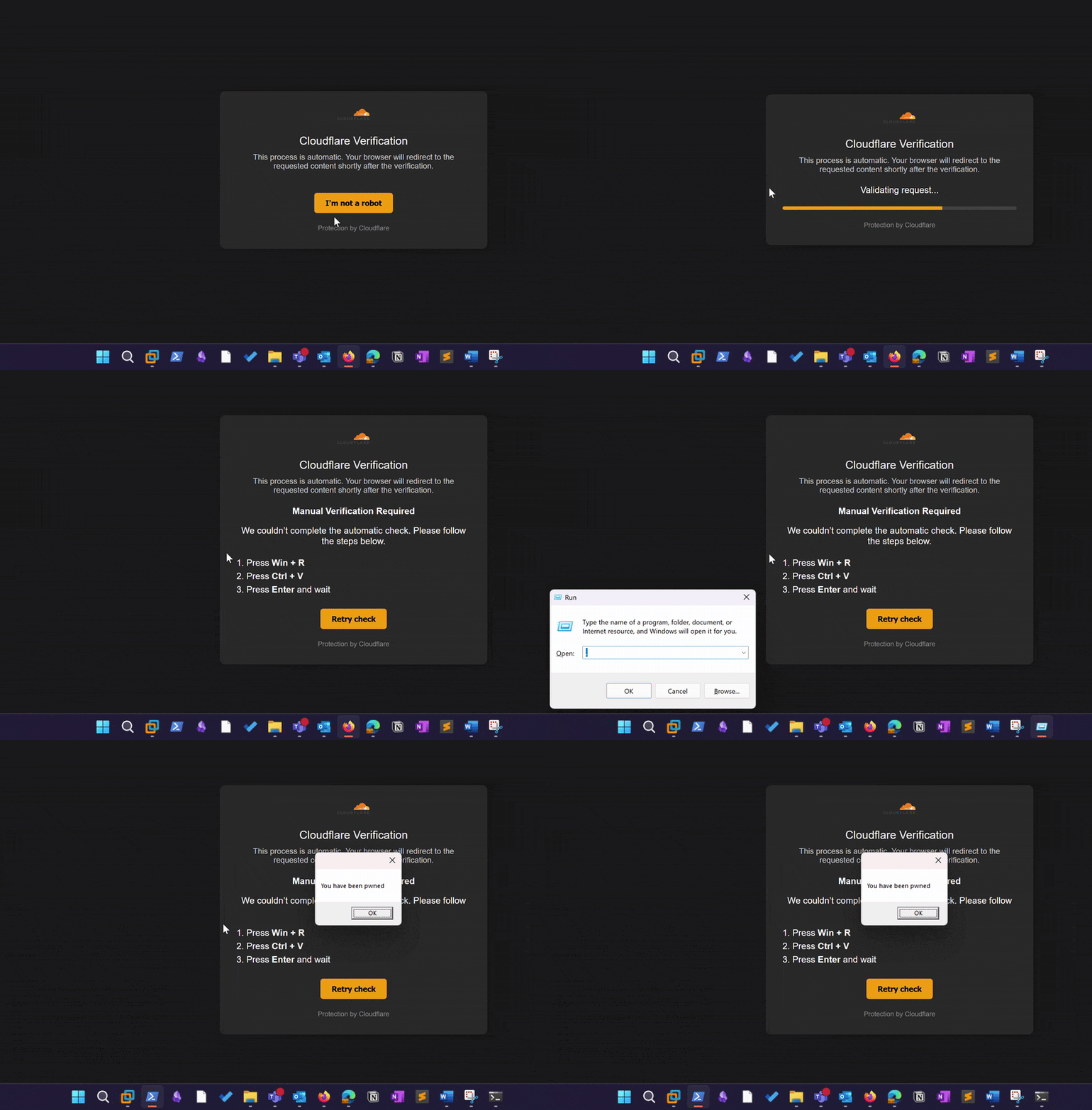
ClickFix takes advantage of the fact that many users perform actions almost automatically as soon as a situation appears trustworthy. A typical example is a fake CAPTCHA or validation page that pretends to need to verify the browser or connection. The design is modeled after well-known services such as Cloudflare, Google reCAPTCHA, or similar platforms. The simple goal is to arouse as little suspicion as possible and trigger an automated routine on the user’s part.
After clicking “I’m not a robot,” a PowerShell command is copied to the clipboard in the background—fully automatically and without the victim’s knowledge. At the same time, the user receives simple instructions:
“To finish the scan, press Win + R, then Win + V, and finally Enter.”
What actually happens is that the previously copied PowerShell command is executed. In a harmless example, it might look like this:
powershell -WindowStyle Hidden -Command "[reflection.assembly]::loadwithpartialname('System.Windows.Forms') | Out-Null; [windows.forms.messagebox]::show('You have been pwned')"
Instead of a harmless message box like the one above, the command could just as easily download a file from the Internet, execute system commands immediately, or make persistent changes to the system. All of this happens without an administrative prompt, without leaving a persistent file on the system, and without any visible windows. Since the victim triggers the execution themselves, many endpoint protection solutions fail to detect it.
FileFix: Payload via the address bar
While ClickFix relies on the Windows “Run” function (CTRL+R), FileFix goes a step further. It prompts the user to select a file to open Windows File Explorer.
What many people don’t know: The address bar in Windows Explorer accepts not only paths but also executable commands. So if a user is tricked into entering what appears to be a file path into the address bar, it may actually contain a system command (e.g., PowerShell). Cleverly placed spaces or comment characters can further obscure the malicious command, making it visually inaccessible to the victim.
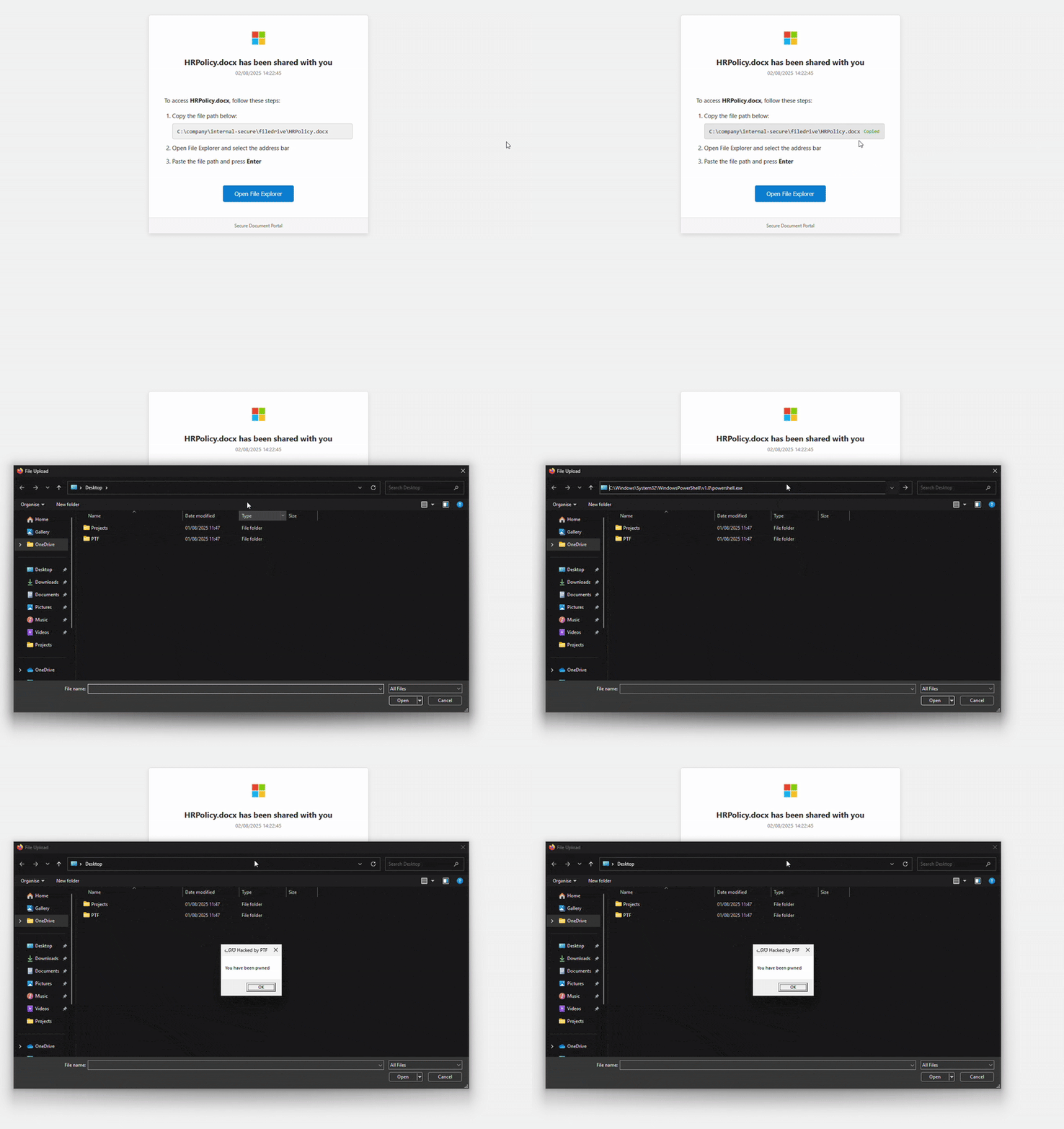
A typical scenario looks like this: The attacker creates a website that purports to provide access to an internal file. The layout resembles a file-sharing platform (e.g., Microsoft SharePoint or OneDrive). The text reads:
“To open the HRPolicy.docx file, copy the path below and paste it into the address bar in File Explorer.”
The path displayed looks something like this:
C:\company\internal-secure\filedrive\HRPolicy.docx
However, what is actually copied to the clipboard is:
powershell -WindowStyle Hidden -Command "[reflection.assembly]::loadwithpartialname('System.Windows.Forms') | Out-Null; [windows.forms.messagebox]::show('You have been pwned','ᓚᘏᗢ Hacked by PTF')" # C:\\company\\internal-secure\\filedrive\\HRPolicy.docx
When pasted into the address bar, the actual PowerShell command is executed. The closing comment, indicated by the “#” character, ensures that the user continues to see the expected file path, while the actual malicious command is visually hidden.
What makes this particularly dangerous is that the program is executed through Explorer itself. In some tests, it was observed that programs executed in this manner no longer carry a MOTW (Mark of the Web) attribute. This can affect SmartScreen and other protective mechanisms that evaluate the origin context behavior and may block execution if necessary.
Why These Techniques Work
Neither method relies on technical vulnerabilities, but rather on a combination of trust, UI deception, and the system’s own behavior. The user believes they are opening a file or solving a problem. In reality, a command is being executed—by the user themselves.
An antivirus program often can’t detect anything here. There’s no dropper, no suspicious signature, and no unusual behavior in the process tree—at least at first glance. Some EDR solutions detect clipboard manipulation, but it’s rarely correlated with a subsequent Win+R command.
Logging is also difficult. Even if PowerShell is enabled and monitored, it can appear to be legitimate user input. Initialization does not occur via a third-party process. As a result, many rule sets in SIEMs fail to detect it.
Protection Options
From a technical standpoint, ClickFix is difficult to detect reliably. The best defensive measures combine monitoring with clear communication with users.
- Restrict or monitor browser access to the clipboard.
- Pay special attention to processes such as powershell.exe, cmd.exe, or mshta.exe that are spawned by explorer.exe or chrome.exe.
- Conduct awareness campaigns using real-life examples. Many users are simply unaware of this type of deception.
In addition to the approaches already mentioned, other technical and organizational measures can be implemented to prevent ClickFix and FileFix attacks—or at least make them significantly more difficult:
Technical Measures
-
Disable certain keyboard shortcuts, such as WIN+R, WIN+E, or WIN+I, via Group Policy (GPO), unless they are absolutely necessary for day-to-day work.
-
Also enable PowerShell script block logging so you can track the commands that were executed.
-
Implement AppLocker—or, more specifically, Windows Defender Application Control (e.g., using AaronLocker)—to prevent unauthorized programs from running.
-
Block known malicious domains using DNS sinkholes or NextGen firewalls, and update filter lists regularly.
-
Enforce the use of browsers that are deeply integrated with EDR (e.g., Microsoft Edge with Defender for Endpoint) to ensure consistent behavior and improved detection.
-
Monitor relevant Windows event IDs (e.g., for process launches, PowerShell usage, or clipboard access) in the SIEM.
Organizational Measures
-
Conduct phishing awareness campaigns on a regular basis, ideally combined with live hacking demonstrations of these attack methods.
-
Establish clear reporting procedures for suspicious websites or files and conduct regular training on them (specify these in the ISMS, if applicable).
-
Allow users to work with as few privileges as possible (Principle of Least Privilege).
-
Raise awareness among internal IT teams about detecting UI-based attacks.
Statistical Background
Recent studies clearly show how much ClickFix campaigns have increased. Since the beginning of 2025, Unit 42 has observed weekly case counts in the double to triple digits, with peaks of over 120 incidents per week. Numerous industries are affected, including high-tech, financial services, manufacturing, retail, government, the legal sector, and the energy industry. In nearly a dozen incident response cases, a ClickFix lure was the initial point of entry. Vectors include compromised legitimate websites, malvertising, YouTube “how-to” videos, and fake support forums; technically, clipboard injection (“pastejacking”) dominates, with instructions to execute via Win+R or Win+X.
In addition, Unit 42 reports in its social engineering situation report that social engineering is overall the most common initial access vector and leads to data breaches significantly more often than other entry methods (about 60% of cases involving data exposure). This underscores that UI-driven deceptions such as ClickFix/FileFix are not just “annoying,” but have operational implications.
Conclusion
ClickFix and FileFix demonstrate that attackers have long since moved beyond relying solely on technical tricks and are increasingly exploiting user behavior through phishing and social engineering. Instead of exploiting a complex security vulnerability, it is often enough to present the user with a credible interface and provide clear instructions. The system then does the rest on the user’s behalf—reliably, without error messages or warnings.
Anyone talking about attack detection and protection mechanisms today should not only discuss CVEs and exploits, but also UI tricks, clipboard chains, and how users behave in stressful situations. After all, if something doesn’t look like an attack, it won’t be treated as one. That’s exactly what makes ClickFix and FileFix so successful.
Additional Resources and Services
Would you like to raise awareness within your company or check whether your measures are protected against techniques such as ClickFix and FileFix?
We support you with:
- Customized phishing awareness campaigns featuring realistic scenarios
- Live Hacking Demos for Executives, Employees, and IT Teams
- Technical Tests for Detecting and Blocking UI-Driven Attacks